
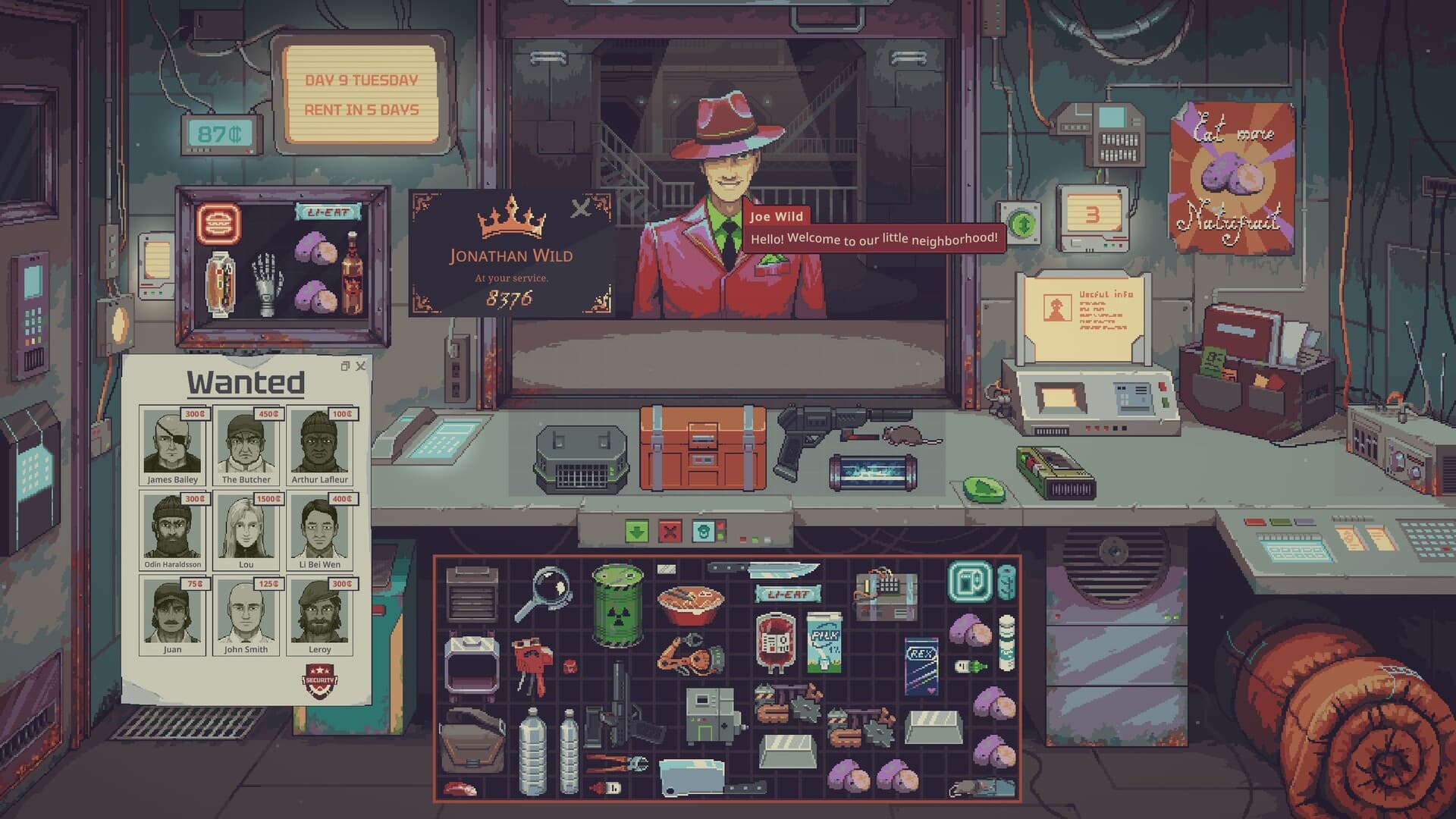
Start Probably Stolen by checking what a customer offers, inspecting the goods and deciding whether the purchase leaves enough money for rent. Keep your first product line manageable while you learn its tools and resale requirements. This Probably Stolen guide explains that routine and the inventory controls documented for the free Demo, with uncertain details marked 待确认 / Pending confirmation.
01
Choose the Demo before planning your first shop
The official Demo page confirms three starting scenarios plus hardcore mode. It specifically gives the Water Merchant scenario a testing and purification kit from the start, a change from the earlier Steam Playtest. Choose that scenario if you want to learn water handling without first having to find the starting kit. This is a practical learning choice, rather than a claim that Water Merchant earns the most money.
The main Steam listing still described a planned October 28, 2026 release in the October 6 research snapshot. Its wider shopkeeping description mentions several careers, machines and production chains. Those advertised possibilities do not establish which entire career paths are playable in the Demo, so follow the scenario choices actually offered by your installed version.
02
Evaluate the purchase before negotiating
Begin with the product rather than the seller's asking price. The official description says suppliers may exaggerate value, while different goods need different checks before resale. Cigarette packs require visual inspection, water needs testing and filtering, and rare goods need appraisal. A cheap offer therefore becomes attractive only after you understand what the item is and what preparing it will involve.
As a beginner, compare the proposed purchase with the work it creates. A machine, permit or treatment requirement can make a seemingly simple resale more demanding than the initial price suggests. Postpone an unfamiliar purchase when you cannot explain how it fits your current shop, and use the appraisal guide for the distinction between authenticity, value and legality.
03
Keep rent money available
Rent rises over time according to the game's official description. Falling behind reduces the shop's attractiveness, brings fewer customers and worsens the revenue problem. Treat the payment shown in your own run as an obligation before spending the rest of your cash on inventory. This budgeting approach follows the stated consequences, rather than an invented rule about keeping a particular percentage of your balance.
An expensive item can tie up money even if you bought it at a good price. The store description warns that merchandise might be confiscated, fail inspection or remain unsold. Before accepting a large deal, consider how your next rent payment would be covered if that item produced no immediate return. The exact rent schedule and a universally safe cash reserve remain 待确认 / Pending confirmation.
04
Sort the inventory you already have
UPDATE 049 documents sorting through a right-click menu on a grid inventory. Open that menu when the counter becomes difficult to read, then use the available sorting choices instead of repeatedly moving every object by hand. An orderly inventory makes it easier to keep track of the stock and tools you intend to use. Sorting is an interface aid, however, and does not inspect an item's authenticity or change whether you own it.
The same update lets you rotate and flip a dragged item using mouse-wheel up, mouse-wheel down and middle click. Use these controls when fitting an item into the space you are arranging. The notes do not assign each transformation to a specific direction, so check the result on screen rather than assuming an undocumented mapping. You can also double-click container items such as the Storage Bay to close their windows.
05
Move groups without losing placement control
Drag a selection box to select multiple items; the update describes that box as bright white. You can then move the selected group together and place it accurately within the same inventory. When moving the group into a different inventory, hold Shift while dragging to enable precise placement. Try this with stock you already recognize so that faster handling does not obscure what you are transferring.
Multi-selected items can also be used together on a target item under the documented update. This capability does not mean every arbitrary group is a valid recipe or machine input. Check the target's instructions and keep different product lines distinguishable before applying a group. The exact accepted inputs for an unfamiliar machine remain 待确认 / Pending confirmation until its own information establishes them.
06
Preview equipment before paying
Containers and machines can be opened and previewed before purchase in UPDATE 049. Use that preview to examine what you are considering while it is still an offer. This is particularly useful when a piece of equipment would consume money you need for stock or rent. Compare its visible purpose with the product line you are already learning rather than buying it merely because it appears advanced.
Previewing does not grant ownership or permission to operate everything you see. The update restricts equipping to owned items and prevents owned items from being inserted into containers you do not own. It also stops the UV filter from being used on unowned items. Treat the preview as information for a purchase decision, not a free processing step for a customer's merchandise.
07
Use tools efficiently when they become available
UPDATE 049 introduces equip mode for selectable items so tools can be used quickly on multiple items. It also introduces the Toolbox, which stores tools, including the blue and red labelers. The published acquisition detail is specific: Doctor Jackson sells the Toolbox after day 14, and keys 1–9 equip its corresponding tool slots. That timing belongs to the Toolbox, not to every scanner or other item sold by that character.
Use the slots to reach tools that support the work you actually perform. A tool being close at hand does not replace reading the item information or interpreting the result it produces. When a scanner is used, the update brings its panel to the front, helping you find the relevant information among open windows. Pressing Escape closes the most recently used item or paper window first when you need to clear the screen.
08
Learn one trade before branching out
The Water Merchant start gives you a concrete product line with a confirmed starting kit. Work through testing and filtering before committing the shop's available cash to an unfamiliar production chain. The water guide covers the documented container, ownership and customer restrictions that matter for this route. Expanding after you understand a trade is a planning recommendation, not a fixed progression requirement imposed by the game.
Customers introduce a separate risk from the goods they carry. The official description establishes faction interests, Security and AI-controlled Augs, but it does not provide a complete checklist for identifying every dangerous customer. Read Aug identification before treating an unexplained behavior as a proven sign. For your next run, keep the Demo information close so comparisons with old Playtest advice or the planned full game stay version-specific.