
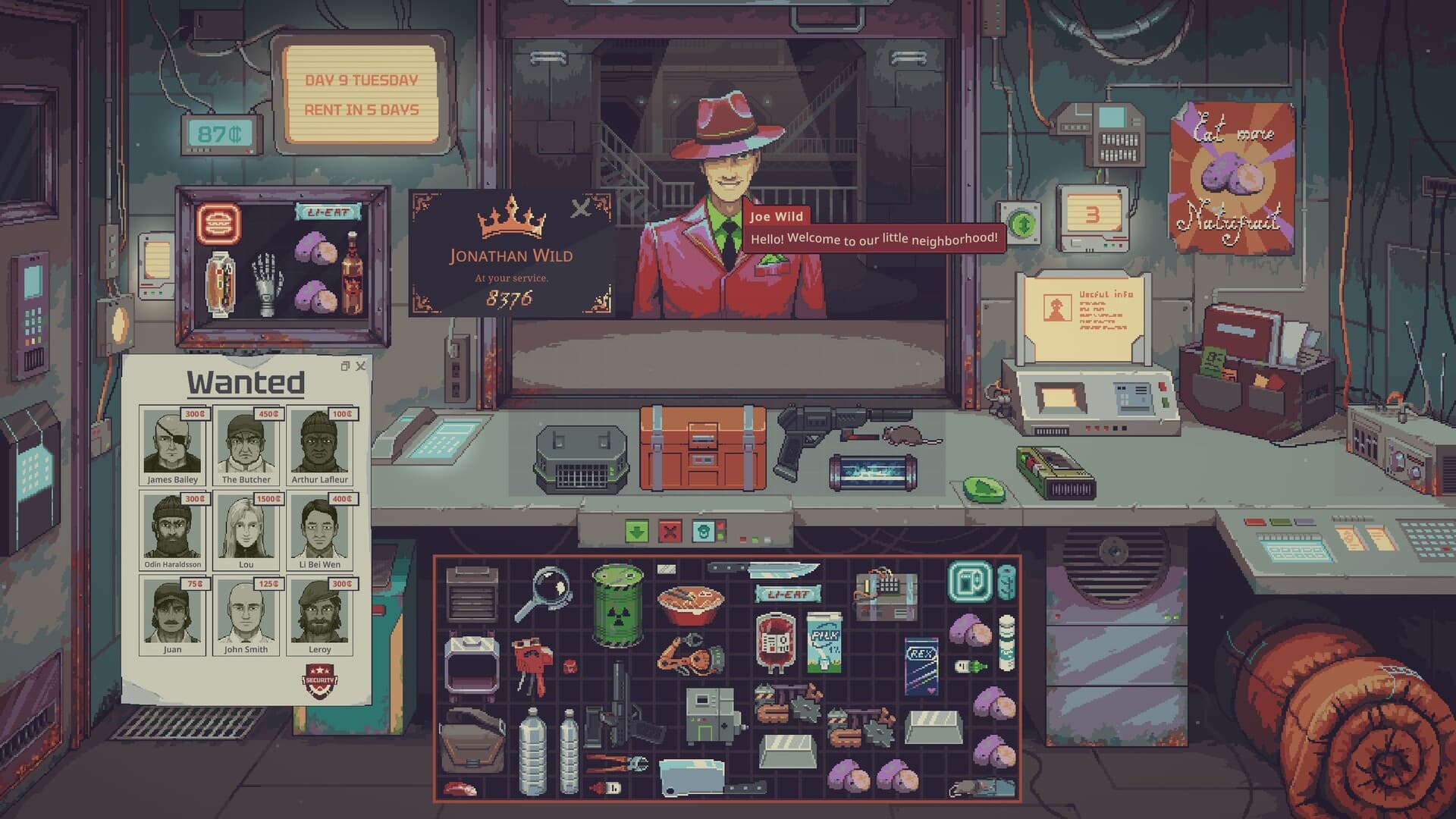
Appraise goods in Probably Stolen before negotiating: identify the item, inspect the information available and use the relevant tool when your build provides one. Then consider its resale requirements and legal risks separately from whether it appears genuine. This Probably Stolen appraisal guide covers the confirmed inspection premise and Demo controls, while unverified counterfeit tells are marked 待确认 / Pending confirmation.
01
Know which version the advice describes
The main Steam description confirms that cigarette packs need visual inspection and rare goods need appraisal to avoid overpaying. It also describes counterfeit products, stolen merchandise, permits and the possibility of trouble after a deal. Those statements establish why inspection matters, but they are not a complete catalog of fake-item variants. The full game remained planned for October 28, 2026 in the October 6 research snapshot.
The official Demo page describes the playable Demo and its three starting scenarios plus hardcore mode. Its update comparison specifically identifies changes from the earlier Steam Playtest, including new tools and upgradeable machines. Check your installed version before following an older recording or importing a control from the planned full game. The actions below are grounded in the published Demo-release notes rather than a claimed test of every product.
02
Separate authenticity, value and permission to trade
A genuine item is not automatically a good purchase. The official description warns that suppliers can exaggerate value and that rare goods need appraisal to avoid paying too much. Consider the asking price only after identifying what is offered and what evidence supports the seller's description. A successful negotiation cannot compensate for misunderstanding the product you bought.
Legal status is another question, because the game describes permits, stolen goods and contraband. A check that supports authenticity does not establish that carrying or reselling the item is permitted. Likewise, knowing that an item is tradable does not establish a profitable resale price. Keep these questions separate when evaluating a deal so one favorable result does not erase the remaining risks.
03
Inspect packaging without inventing a fake-item checklist
Cigarette packs are the concrete visual-inspection example in the official store description. Examine the product information and the inspection interface available for the item you are considering. Use visible details as observations about that particular offer rather than assuming a universal counterfeit mark across every brand. The researched official material does not identify a specific font, logo spacing or package-color difference as a reliable fake-item test.
An exhaustive picture-based counterfeit checklist therefore remains 待确认 / Pending confirmation. If an item's identity is unresolved, regard that uncertainty as part of the purchase decision instead of presenting a guess as verification. A lower asking price may make a risk affordable, but it does not change what you have established about the merchandise. For a beginner, waiting for an item you understand is a reasonable budgeting choice rather than a guaranteed winning strategy.
04
Preview containers and machines while evaluating an offer
UPDATE 049 lets players open and preview containers and machines before buying them. Use the preview to inspect the equipment you are considering and relate its visible purpose to your current shop. This can prevent buying a machine merely because it sounds valuable when you do not understand its role. Previewing is an opportunity to gather information, not proof of authenticity or a promise that the purchase will pay for itself.
Keep ownership in mind while examining the offer. UPDATE 049 permits only owned items to be equipped and prevents owned items from being inserted into containers you do not own. It also prevents the UV filter from being used on unowned items. These restrictions separate checking an offer from treating a customer's goods as usable shop inventory.
05
Reach tools and results without losing track of the item
Equip mode was added for selectable items so tools can be used quickly on multiple items. The Toolbox stores tools, including the blue and red labelers, and its documented slots are equipped with keys 1–9. Doctor Jackson sells that Toolbox after day 14 according to the same update. Do not apply that acquisition timing to the Aug scanner or another tool whose unlock conditions are not established here.
When you use a scanner, UPDATE 049 brings its panel to the front even if it was already open behind another window. Read that relevant result before returning to price negotiation or switching to the next object. Escape closes the most recently used item or paper window first, helping you clear the interface in a consistent order. Tool access and window behavior make the process easier to manage, but they do not establish what every scanner result means.
06
Use labels for organization rather than proof
The blue and red labelers being stored in the Toolbox does not make them authentication tools. The official description allows counterfeit products to be relabeled as genuine, so a label cannot be treated as independent proof of the item's actual origin. UPDATE 049 also makes a container window display the custom name supplied by the Blue Labeler. Use that naming feature to recognize containers you organize, while keeping your inspection conclusion separate from the text you assign.
Inventory sorting is available from the right-click menu on a grid inventory. A bright-white drag-selection box lets you move several items together, with Shift enabling precise placement when moving into a different inventory. These controls can keep identified stock distinct from purchases you are still evaluating. Grouping, sorting or renaming items changes how you handle them, rather than supplying missing evidence about whether they are genuine.
07
Read bargaining information in the correct direction
UPDATE 049 says the bargaining panel now shows a reputation multiplier for each trade direction. It also fixes buy-side and sell-side bargains affecting reputation gains in the opposite direction. Read the information for the transaction you are actually negotiating rather than assuming that a previous sale's result applies to the next purchase. The update adjusts how bargaining affects customer budgets, but it does not publish one discount every customer will accept.
A fixed appraisal threshold, guaranteed negotiating percentage and universal rare-item resale margin remain 待确认 / Pending confirmation. Compare the current offer with your own inspection results and known obligations before accepting it. The beginner guide explains why stock that fails inspection or remains unsold can threaten the next rent payment. Rent planning is especially relevant when one uncertain item would consume most of the cash available for your shop.
08
Account for goods inside a container
UPDATE 049 fixes the pricing of items inside sold containers. Premium and discount buyers should no longer apply their modifier twice to boxed contents under the documented correction. Compare the displayed transaction as a whole instead of adding an old double-modifier assumption from Playtest advice. That fix addresses pricing calculation, not the authenticity of the objects stored inside the box.
When liquid is involved, container status also changes what the offer represents. Water containers count as water goods while filled and household goods when empty, while market events reprice both the liquid and the container. The water guide explains those rules and the separate testing requirements. An appraisal routine for rare goods should not be presented as a replacement for water testing, filtering or product-specific buyer restrictions.